728x90
2023.02.01 - [JAVA/Java 기초] - JSON 데이터형식.java
JSON 데이터형식.java
JSON 네트워크로 전달하는 데이터 형식 두 개 이상의 속성이 있으면 객체 {}로 표기합니다. 두 개 이상의 값이 있으면 배열[]로 표기합니다. JSON 라이브러리 다운로드 : https://github.com/stleary/JSON-java
less-go.tistory.com
이전 내용에서 계속 됩니다
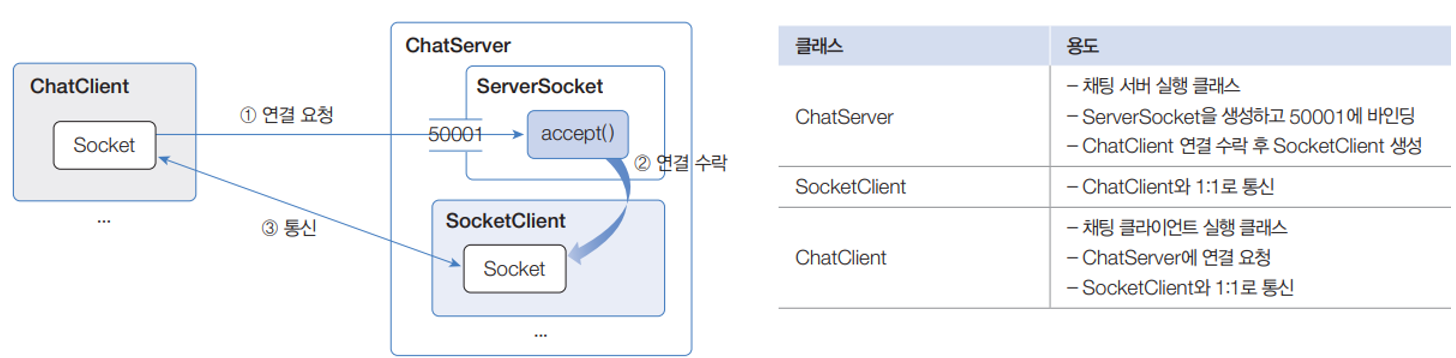
채팅 서버와 클라이언트 구현
- TCP 네트워킹을 이용해서 채팅 서버와 클라이언트를 구현합니다.
- 채팅 서버: ChatServer는 채팅 서버 실행 클래스로 클라이언트의 연결 요청을 수락하고 통신용 SocketClient를 생성하는 역할
- 채팅 클라이언트 : 단일 클래스 ChatClient는 채팅 서버로 연결을 요청하고, 연결된 후에는 제일 먼저 대화명을 보내며 다음 서버와 메시지를 주고 받습니다.
//ChatServer부

package ChatPG2;

import java.io.IOException;
import java.net.ServerSocket;
import java.net.Socket;
import java.util.Collection;
import java.util.Collections;
import java.util.HashMap;
import java.util.Map;
import java.util.Scanner;
import java.util.concurrent.ExecutorService;
import java.util.concurrent.Executors;

import org.json.JSONObject;

public class ChatServer {

	//	필드
	ServerSocket serverSocket;	//서버 소켓
	ExecutorService threadPool = Executors.newFixedThreadPool(100); //스레드풀 100명제한
	Map<String, SocketClient> chatRoom =
			Collections.synchronizedMap(new HashMap<>());

	public static void main(String[] args) {
		try {
			ChatServer chatServer = new ChatServer();
			chatServer.start();

			System.out.println("-----------------------------------------");
			System.out.println("서버를 종료하려면 q를 입력하고 Enter키를 입력 하세요.");
			System.out.println("-----------------------------------------");

			Scanner sc = new Scanner(System.in);

			while(true) {
				String key = sc.nextLine();
				if(key.equals("q")) break;
			}

			sc.close();
			chatServer.stop();

		}catch (IOException e) {
		}

	}

	// 메서드 : 서버 시작
	public void start() throws IOException{
		serverSocket = new ServerSocket(50001);
		System.out.println("[서버] 시작됨");

		Thread thread = new Thread(() -> {
			try {
				while(true) {
					Socket socket = serverSocket.accept();
					SocketClient sc = new SocketClient(this, socket);
				}
			}catch (IOException e) {}
		});
		thread.start();
	}

	//메서드 : 클라이언트 연결시 SocketClient 생성 및 추가
	public void addSocketClient(SocketClient socketClient) {
		String key = socketClient.chatName + "@" + socketClient.clientIp;
		chatRoom.put(key, socketClient);
		System.out.println("입장: " + key);
		System.out.println("현재 채팅자 수: " + chatRoom.size() + "\n");
	}

	// 메서드 : 클라이언트 연결 종료시 SocketClient 제거
	public void removeSocketClient(SocketClient socketClient) {
		String key = socketClient.chatName + "@"+socketClient.clientIp;
		chatRoom.remove(key);
		System.out.println("나감: " + key);
		System.out.println("현재 채팅자 수 : " + chatRoom.size() + "\n");
	}

	//메서드 : 모든 클라이언트에게 메시지 보내기
	public void sendToAll(SocketClient sender, String message) {
		JSONObject root = new JSONObject();
		root.put("clientIp", sender.clientIp);
		root.put("chatName", sender.chatName);
		root.put("message", message);
		String json = root.toString();

		Collection<SocketClient> socketClients = chatRoom.values();
		for(SocketClient sc : socketClients){
			if(sc == sender) continue;
			sc.send(json);
		}
	}

	//메서드 : 서버종료
	public void stop() {
		try {
			serverSocket.close();
			threadPool.shutdown();
			chatRoom.values().stream().forEach(sc -> sc.close());
			System.out.println("[서버] 종료됨");
		}catch(IOException e1) {}
	}
}
결과 :
[서버] 시작됨
-----------------------------------------
서버를 종료하려면 q를 입력하고 Enter키를 입력 하세요.
-----------------------------------------
q
[서버] 종료됨
//SocketClient 부

import java.io.DataInputStream;
import java.io.DataOutputStream;
import java.io.IOException;
import java.net.InetSocketAddress;
import java.net.Socket;

import javax.sound.midi.Receiver;

import org.json.JSONObject;

public class SocketClient {

	//필드
	ChatServer chatServer;
	Socket socket;
	DataInputStream dis;
	DataOutputStream dos;
	String clientIp;
	String chatName;

	//생성자
	public SocketClient(ChatServer chatServer, Socket socket){
		try {
			this.chatServer = chatServer;
			this.socket = socket;
			this.dis = new DataInputStream(socket.getInputStream());
			this.dos = new DataOutputStream(socket.getOutputStream());
			InetSocketAddress isa = (InetSocketAddress) socket.getRemoteSocketAddress();
			this.clientIp = isa.getHostName();
			receive();
		}catch (IOException e) {}
	}

	//메서드 : JSON 받기
	public void receive() {
		chatServer.threadPool.execute(() -> {
			try {
				while(true) {
					String receiveJson = dis.readUTF();

					JSONObject jsonObject = new JSONObject(receiveJson);

					String command = jsonObject.getString("command");

					switch(command) {
					case "incoming" :	// 채팅방 입장하는 경우
						this.chatName = jsonObject.getString("data");
						chatServer.sendToAll(this, "들어오셨습니다."); // 환영문구
						chatServer.addSocketClient(this);
						break;

					case "message" :	//메시지 보내는 경우
						String message = jsonObject.getString("data");
						chatServer.sendToAll(this, message);
						break;

					}
				}
			}catch(IOException e) {
				chatServer.sendToAll(this, "나가셨습니다.");
				chatServer.removeSocketClient(this);
			}
		});
	}
	// 메서드 : JSON 보내기
	public void send(String json) {
		try {
			dos.writeUTF(json);	// 스트링 형태로 json 내용 보내기
			dos.flush();		// 사용한 메모리 정리
		}catch (IOException e) {}
	}

	//메서드 : 연결 종료
	public void close() {
		try {
			socket.close();	// 클라이언트에 대한 socket 끊기
		}catch(Exception e) {}
	}
}
//ChatClient부
import java.io.DataOutputStream;
import java.io.DataInputStream;
import java.io.IOException;
import java.net.Socket;
import java.util.Scanner;
import org.json.JSONObject;
public class ChatClient {
//필드
Socket socket;
DataInputStream dis;
DataOutputStream dos;
String chatName;
//메서드 : 서버연결
public void connect() throws IOException{
socket = new Socket("172.20.20.22", 50001);
dis = new DataInputStream(socket.getInputStream());
dos = new DataOutputStream(socket.getOutputStream());
System.out.println("[클라이언트] 서버에 연결됨");
}
//메서드 : JSON 받기
public void receive() {
Thread thread = new Thread(() -> {
try {
while(true) {
String json = dis.readUTF();
JSONObject root = new JSONObject(json);
String clientIp = root.getString("clientIp");
String chatName = root.getString("chatName");
String message = root.getString("message");
System.out.println("<" + chatName + "@" + clientIp + "> " + message);
}
}catch (Exception e) {
System.out.println("[클라이언트] 서버 연결 끊김");
System.exit(0);
}
});
thread.start();
}
// 메서드 : JSON 보내기
public void send(String json) throws IOException {
dos.writeUTF(json);
dos.flush();
}
// 메서드 : 서버 연결 종료
public void unconnect() throws IOException {
socket.close();
}
// 메서드 : 메인
public static void main(String[] args) {
try {
ChatClient chatClient = new ChatClient();
chatClient.connect();
Scanner sc = new Scanner(System.in);
System.out.println("대화명 입력 : ");
chatClient.chatName = sc.nextLine();
JSONObject jsonObject = new JSONObject();
jsonObject.put("command", "incoming");
jsonObject.put("data", chatClient.chatName);
String json = jsonObject.toString();
chatClient.send(json);
chatClient.receive();
System.out.println("--------------------------------");
System.out.println("보낼 메시지를 입력하고 Enter");
System.out.println("채팅을 종료하려면 q를 입력하고 Enter");
System.out.println("--------------------------------");
while(true) {
String message = sc.nextLine();
if(message.toLowerCase().equals("q")) {
break;
}else {
jsonObject = new JSONObject();
jsonObject.put("command", "message");
jsonObject.put("data", message);
json = jsonObject.toString();
chatClient.send(json);
}
}
sc.close();
chatClient.unconnect();
}catch(IOException e) {
System.out.println("[클라이언트] 서버 연결 안됨");
}
}
}728x90
'JAVA > Java 기초' 카테고리의 다른 글
| 데이터베이스 입출력-2(프로시저와 함수 호출).Java (0) | 2023.02.14 |
|---|---|
| 데이터베이스 입출력(Database I/O).Java (0) | 2023.02.13 |
| JSON 데이터형식.java (0) | 2023.02.01 |
| 서버의 동시 요청 처리.java (0) | 2023.02.01 |
| 네트워크 기초(IP, TCP, UDP).java (0) | 2023.01.31 |