728x90
제약 조건(Constraint) 이란?
- 데이터의 무결성을 지키기 위한 제한된 조건을 의미
- 특정 데이터를 입력 시 어떠한 조건을 만족했을 때에 입력이 되도록 제약하는것
- ex) 동일한 아이디로 다시 회원가입이 안되는 것
- 데이터 무결성을 위한 제약조건
- PRIMARY KEY 제약 조건
- FOREIGN KEY 제약 조건
- UNIQUE 제약 조건
- CHECK 제약 조건(MySQL 8.0.16부터 지원)
- DEFAULT 정의
- NULL 값 허용
데이터 무결성을 위한 제약 조건
기본 키(Primary Key) 제약 조건
- 기본 키(Primary Key) 란?
- 테이블에 존재하는 많은 행의 데이터를 구분할 수 있는 식별자
- 중복이나 NULL값이 입력될 수 없음
- ex) 회원 테이블의 회원 아이디, 학생 테이블이 학번
- 기본 키로 생성한 것은 자동으로 클러스터형 인덱스 생성
- 테이블에서는 기본 키를 하나 이상 열에 설정 가능
기본키 생성 방법
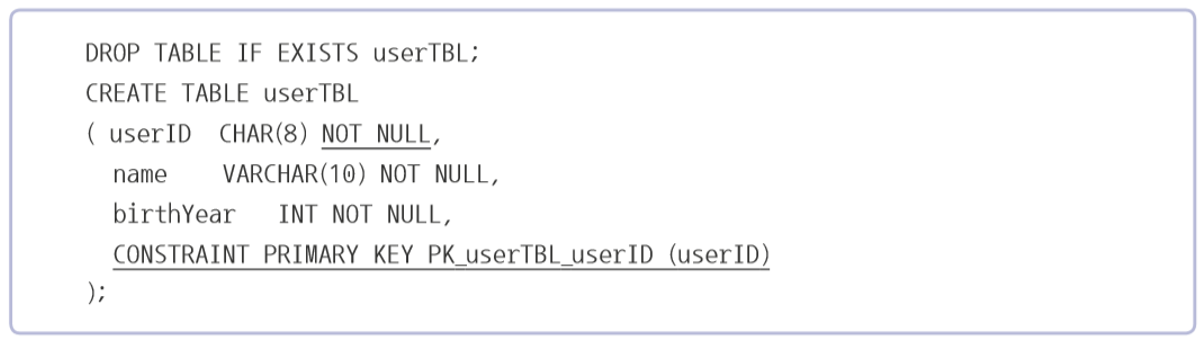
use tabledb;

-- 테이블 생성하는 방법
-- 필요한 칼럼과 타입에 설정부여
-- not null : 반드시 입력을 해야 되는 컬럼
-- primary key : 중복이 되면 안되는 컬럼(PK)
-- auto_increment : 자동으로 입력할 컬럼
-- foreign key : 외래키 : 제약조건 : 관계 설정

drop table if exists buytbl;
drop table if exists usertbl;

create table usertbl (
	userid 	char(8) not null primary key,	-- 사용자 아이디
    name	varchar(10) not null,			-- 이름
    birthYear int not null,					-- 출생년도
    addr 	char(2) not null,				-- 지역 ( 서울, 경기, 경남 ...)
    mobile1 char(3),						-- 휴대폰 국번
    movile2 char(8),						-- 전화번호
    height 	smallint,						-- 키
    mDate	date							-- 가입일
);

create table buytbl(
	num 		int auto_increment not null primary key,	-- 순번 (자동으로 기입)
    userid		char(8) not null,							-- 사용자 아이디
    prodName 	char(6) not null,							-- 물품명
    groupName 	char(4),									-- 분류
    price		int not null,								-- 단가
    amount		smallint not null,							-- 수량
    foreign key(userid) references usertbl(userid)
);

-- 생성된 테이블 확인

desc usertbl;
desc buytbl;

-- 데이터 입력
insert into usertbl values ('LSG', '이승기', 1987, '서울', '011', '11111111', 182, '2008-08-08');
insert into usertbl values ('KBS', '김범수', 1979, '경남', '011', '22222222', 173, '2012-04-04');
insert into usertbl values ('KKH', '김경호', 1971, '전남', '019', '33333333', 177, '2007-07-07');

insert into buytbl values (null, 'KBS', '운동화', null, 30, 2);
insert into buytbl values (null, 'KBS', '노트북', '전자', 1000, 1);
-- insert into buytbl values (null, 'JYP', '모니터', '전자', 200, 1); 제약조건 외래키에 의해 usertbl에 없는 userid는 입력 불가

select * from buytbl;

delete from buytbl where num = 3;

drop table if exists buytbl;
drop table if exists usertbl;

-- 일반적으로 많이 사용하는 primary key 설정 방법
create table usertbl (
	userid 	char(8) not null primary key,	-- 사용자 아이디
    name	varchar(10) not null,			-- 이름
    birthYear int not null					-- 출생년도
);

--  primary key 따로 설정 방법
create table usertbl
(
	userid char(8) not null,
    name varchar(10) not null,
    birthYear int not null,
    constraint primary key PK_usertbl_userid (userID)
);

show keys from usertbl;

-- 테이블 생성시 기본키 설정을 빼고 테이블 생성을 한 경우
drop table if exists usertbl;

create table usertbl
(
	userID char(8) not null,
    name varchar(10) not null,
    birthYear int not null
);

-- 테이블 수정을 통해 기본 키 설정
ALTER TABLE usertbl
	add constraint primary key PK_usertbl_userID (userid);

show keys from usertbl;

-- 여러 컬럼을 기본 키로 설정
drop table if exists usertbl;

create table prodTBL
(
	prodCode	char(3) not null,	-- 제품 코드
    prodID		char(4) not null,	-- 제품 일련 번호
    prodDate	datetime not null,	-- 제조 일자
    prodCur		char(10) null		-- 현 상태
);

alter table prodTbl
	add constraint PK_prodtbl_prodCode_prodID
		primary key(prodcode, prodID);		-- prodCode 컬럼과 prodID 컬럼을 합쳐서 기본키로 설정

show keys from prodTbl;

show index from prodtbl;
외래 키(FOREIGN KEY) 제약 조건
- 외래 키(Foreign key) 제약 조건
- 두 테이블 사이의 관계 선언하여 데이터의 무결성을 보장 해 주는 역할입니다.
- 외래 키 관계를 설정하면 하나의 테이블이 다른 테이블에 의존 합니다.
- 외래 키 테이블이 참조하는 기준 테이블의 열은 반드시 Primary Key이거나 Unique 제약 조건이 설정 되어 있어야 합니다.
- 외래 키의 옵션 중 ON DELETE CASCADE 또는 ON UPDATE CASCADE
- 기준 테이블의 데이터가 변경 되었을 때 외래 키 테이블도 자동으로 적용되도록 설정합니다.
drop table if exists usertbl;
drop table if exists buytbl;

create table usertbl
(
	userid char(8) not null primary key,
    name varchar(10) not null,
    birthYear int not null
);

create table buytbl
(
	num int auto_increment not null primary key,
    userid char(8) not null,
    prodName char(6) not null,
    FOREIGN KEY(userID) references usertbl(userid)
);

-- 외래키 추가
alter table buytbl
	add constraint FK_userTbl_buytbl 	-- 제약 조건 이름
	foreign key(userID)					-- 외래키지정 컬럼
    references usertbl(userid);			-- 참조하는 테이블의 컬럼

show keys from buytbl;
show index from buytbl;
UNIQUE 제약 조건
- '중복되지 않는 유일한 값' 을 입력해야 하는조건
- PRIMARY KEY와 비슷하나 UNIQUE 는 NULL 값 허용
- NULL은 여러개가 입력되어도 상관 없음
- ex) 회원 테이블 Email 주소 Unique로 설정

CHECK 제약 조건
- 입력되는 데이터를 점검 하는 기능
- EX) 키(HEIGHT) 제한 - 마이너스 값이 들어올 수 없도록,
- 출생년도 제한 - 1900년 이후이고 현재시점 이전
- ALTER TABLE문으로 제약 조건 추가 가능
create table usertbl
(
	userid char(8) primary key,
    name	varchar(10),
	birthyear	int check (birthYear >= 1900 and birthyear <= 2023),
    mobile1 char(3) null,
    constraint CK_name check (name is not null)		-- name에 check 조건 추가
);

-- 추가 mobile1 국번에는 제한 010, 011, 016, 017, 018, 019
alter table usertbl
	add constraint CK_mobile1
    CHECK (mobile1 in ('010', '011', '016', '017', '019'));
DEFAULT 정의
- 값 입력하지 않았을 때 자동으로 입력되는 기본 값 정의 하는 방법
- ALTER TABLE 사용 시에 열에 DEFAULT를 지정 하기 위해서 ALTER COLUMN문 사용
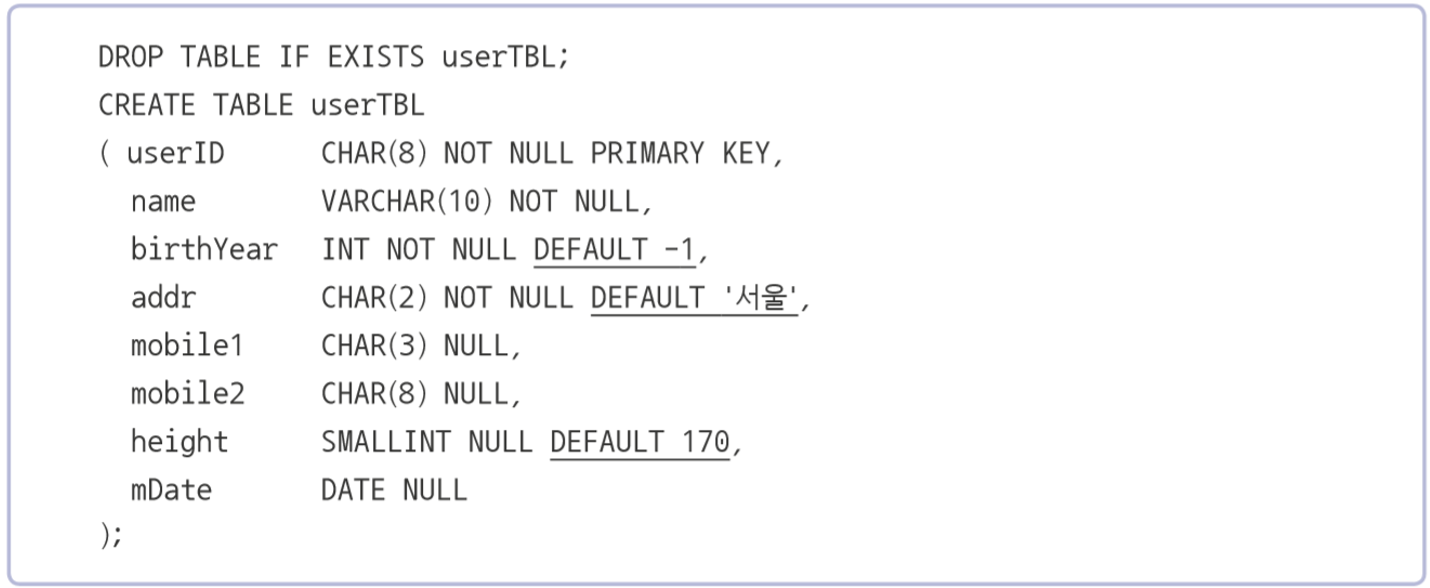
-- 테이블 생성후 테이블 수정 컬럼 수정을 통해 default 정의
create table usertbl
(
	userid char(8) not null primary key,
    name varchar(10) not null,
    birthyear	int not null,
    addr char(2) not null ,
    mobile1	char(3) null,
    mobile2 char(8) null,
    height smallint null ,
    mdate	date null
);

alter table usertbl
	alter column birthyear set default -1;
alter table usertbl
	alter column addr set default '서울';
alter table usertbl
	alter column height set default 170;

NULL 값 허용
- NULL 값을 허용하려면 NULL을, 허용하지 않으려면 NOT NULL을 사용
- PRIMARY KEY가 설정된 열에는 생략하면 자동으로 NOT NULL
- NULL 값은 '아무것도 없다' 라는 의미, 공백(' ') 이나 0과 다름
728x90
'MySQL' 카테고리의 다른 글
| 뷰(View)의 개념.MySQL (0) | 2023.02.09 |
|---|---|
| 테이블(Table).MySQL (0) | 2023.02.08 |
| 스토어드 프로시저(Procedure)를 이용한 프로그래밍.MySQL (0) | 2023.02.08 |
| MySQL의 데이터 형식-5(피벗구현, JSON데이터).MySQL (0) | 2023.02.07 |
| MySQL의 데이터 형식-4(시스템 정보 함수).MySQL (0) | 2023.02.07 |