728x90
뷰의 개념
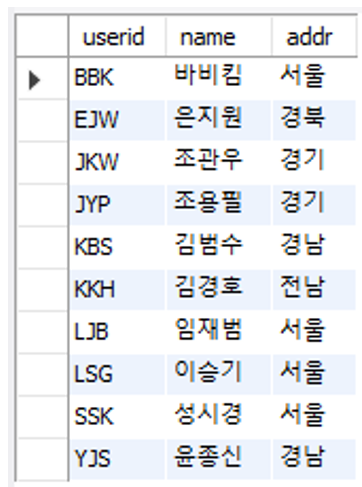
- 일반 사용자 입장에서 테이블과 동일하게 사용하는 개체
- 뷰를 생성한 후에는 테이블처럼 접근 가능하여 동일한 결과 얻을 수 있습니다.
- 뷰의 작동방식

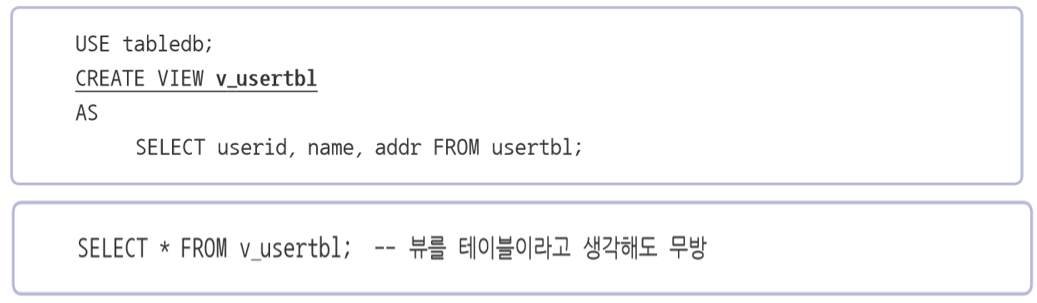
- 뷰 생성 구문
뷰의 장점
- 보안에 도움
- 사용자가 중요한 정보에 바로 접근하지 못함
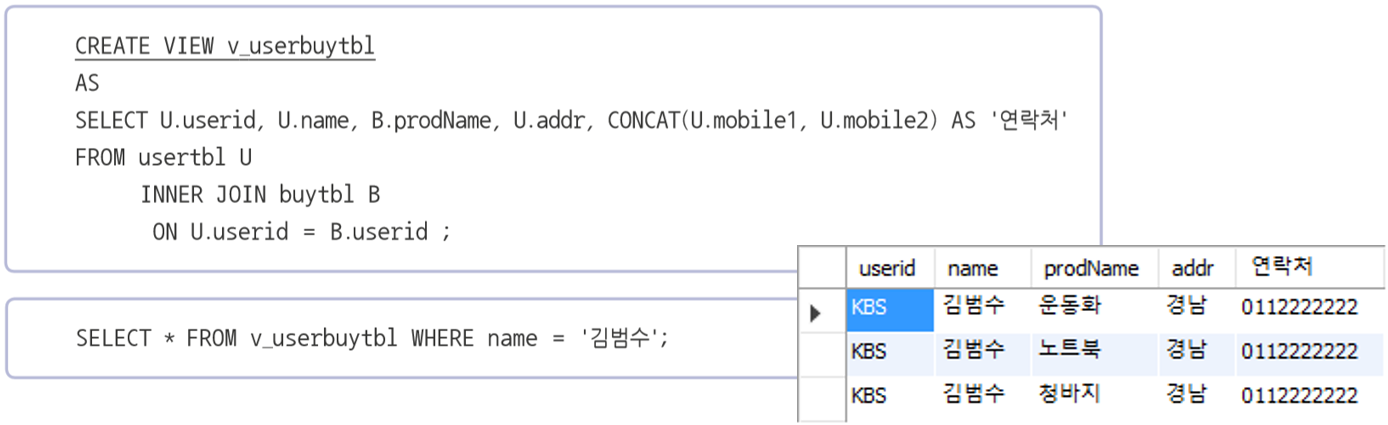
- 복잡한 쿼리 단순화
- 긴 쿼리를 뷰로 작성, 뷰를 테이블 처럼 사용가능
-- 뷰 (view) : 테이블과 동일하게 사용하는 개체
use sqldb;

-- 테이블 생성
-- 회원 테이블
create table usertbl (
   userID char(8)       not null primary key,      -- 사용자 아이디(pk)
    name varchar(10)    not null,               -- 이름
    birthYear int       not null,               -- 출생년도
    addr char(2)       not null,               -- 지역 : 경기, 서울, 경남 식으로 2글자 입력
    mobile1 char(3),                        -- 휴대폰의 국번 : 011, 016, 017, 018, 019, 010
    mobile2 char(8),                        -- 휴대폰의 나머지 전화번호
    height smallint,                         -- 키
    mData date                              -- 회원가입일
);

-- 회원 구매 테이블 (buytbl)
create table buytbl (
num int auto_increment not null primary key,       -- 순번(pk), auto_increment : 자동으로 값 입력
userID char(8) not null,                     -- 아이디(fk)
prodName char(6),                           -- 물품명
groupName char(4),                           -- 분류
price int not null,                           -- 단가
amount smallint not null,                     -- 수량
foreign key (userID) references usertbl(userID)      -- 외래키(FK) 설정
);


-- 테이블에 데이터 입력
INSERT INTO usertbl VALUES('LSG', '이승기', 1987, '서울', '011', '1111111', 182, '2008-8-8');
INSERT INTO usertbl VALUES('KBS', '김범수', 1979, '경남', '011', '2222222', 173, '2012-4-4');
INSERT INTO usertbl VALUES('KKH', '김경호', 1971, '전남', '019', '3333333', 177, '2007-7-7');
INSERT INTO usertbl VALUES('JYP', '조용필', 1950, '경기', '011', '4444444', 166, '2009-4-4');
INSERT INTO usertbl VALUES('SSK', '성시경', 1979, '서울', NULL  , NULL      , 186, '2013-12-12');
INSERT INTO usertbl VALUES('LJB', '임재범', 1963, '서울', '016', '6666666', 182, '2009-9-9');
INSERT INTO usertbl VALUES('YJS', '윤종신', 1969, '경남', NULL  , NULL      , 170, '2005-5-5');
INSERT INTO usertbl VALUES('EJW', '은지원', 1972, '경북', '011', '8888888', 174, '2014-3-3');
INSERT INTO usertbl VALUES('JKW', '조관우', 1965, '경기', '018', '9999999', 172, '2010-10-10');
INSERT INTO usertbl VALUES('BBK', '바비킴', 1973, '서울', '010', '0000000', 176, '2013-5-5');
INSERT INTO buytbl VALUES(NULL, 'KBS', '운동화', NULL   , 30,   2);
INSERT INTO buytbl VALUES(NULL, 'KBS', '노트북', '전자', 1000, 1);
INSERT INTO buytbl VALUES(NULL, 'JYP', '모니터', '전자', 200,  1);
INSERT INTO buytbl VALUES(NULL, 'BBK', '모니터', '전자', 200,  5);
INSERT INTO buytbl VALUES(NULL, 'KBS', '청바지', '의류', 50,   3);
INSERT INTO buytbl VALUES(NULL, 'BBK', '메모리', '전자', 80,  10);
INSERT INTO buytbl VALUES(NULL, 'SSK', '책'    , '서적', 15,   5);
INSERT INTO buytbl VALUES(NULL, 'EJW', '책'    , '서적', 15,   2);
INSERT INTO buytbl VALUES(NULL, 'EJW', '청바지', '의류', 50,   1);
INSERT INTO buytbl VALUES(NULL, 'BBK', '운동화', NULL   , 30,   2);
INSERT INTO buytbl VALUES(NULL, 'EJW', '책'    , '서적', 15,   1);
INSERT INTO buytbl VALUES(NULL, 'BBK', '운동화', NULL   , 30,   2);

select * from usertbl;

create view v_usertbl
as
	select userid, name, addr from usertbl;

select * from v_usertbl;

-- 기본 적인 뷰 생성, 뷰 생성시 뷰에 사용될 열의 이름을 변경 가능합니다

create view v_userbuytbl
as
	select u.userid as 'user id', u.name as 'user name', b.prodname as 'product name',
	u.addr, concat(u.mobile1, u.mobile2) as 'mobile phone'
    from usertbl u
		inner join buytbl b
			on u.userid = b.userid;

select * from v_userbuytbl;

select user id, user name from v_userbuytbl;	-- 에러 발생 : 컬럼에 스페이스바 때문에 인식 문제로 에러 발생

select `user id`, `user name` from v_userbuytbl;	-- 해결 : `백틱을 이용해서 묶어주면 해결

-- 뷰 수정 ALTER VIEW
alter view v_userbuytbl
as
	select u.userid as '사용자 아이디', u.name as '이름', b.prodname as '제품 이름',
    u.addr, concat(u.mobile1, u.mobile2) as '전화 번호'
    from usertbl u
		inner join buytbl b
			on u.userid = b.userid;

select * from v_userbuytbl;

select `이름`, `전화 번호` from v_userbuytbl;

-- 뷰 삭제 drop view
drop view v_userbuytbl;

-- 뷰 정보 확인
use sqldb;

create or replace view v_usertbl
as
   select userid, name, addr from usertbl;

desc v_usertbl;

show create view v_usertbl;

select * from v_usertbl;

-- 뷰의 수정 : 뷰 통해서 실제 데이터 변경
update v_usertbl set addr = '부산' where userid = 'JKW';

-- 뷰를 통한 데이터 입력 : not null에 처리가 되어야지만 뷰를 통해서 데이터 입력 가능
insert into v_usertbl(suerid, name, addr) values('KBM', '김병만', '충북');

desc usertbl;

-- 그룹 함수를 포함하는 뷰 : 집계함수로 정의된 뷰 - 수정이 되지 않는다.
create view v_sum
as
   select userid as 'userid', sum(price * amount) as 'total'
      from buytbl group by userid;

select * from v_sum;

select * from information_schema.views
	where table_schema = 'sqldb' and table_name = 'v_sum';

-- 항목 : is_updatable - 데이터를 수정, no : 수정이 불가능 (insert, update, delete)
-- view를 통해서 데이터의 수정이나 삭제할 수 없는 경우
-- union all, join 등을 사용한 뷰
-- distinct, group by 등을 사용한 뷰

-- 뷰를 통한 데이터 입력 : 조건을 이용해서 view 를 생성시
create view v_height177
as
	select * from usertbl where height >= 177;

select * from v_height177;

-- 177 미만인 사용자를 삭제 : v_height177 뷰 안에는 177 미만인 사용자가 없어서 데이터가 삭제되지 않습니다.
delete from v_height177 where height < 177;

-- 177 미만인 사용자를 추가
insert into v_height177 values('KBM', '김병만', 1977, '경기', '010', '55555555', 158, '2023-01-01');

select * from v_height177;

select * from usertbl;

-- 뷰 : 177 이상인 사용자만 다룰수 있는 권한 : 조건 옵션에 맞는 데이터만 입력 가능하게 설정
alter view v_height177
as
	select * from usertbl where height >= 177
		with check option;		-- where 부분을 체크

insert into v_height177 values('SJH', '서장훈', 2006, '서울', '010', '33333333', 155, '2023-03-03');

-- 2개 이상의 테이블이 관련된 복합 뷰
create view v_userbuytbl
as
	select u.userid , u.name, b.prodname,
    u.addr, concat(u.mobile1, u.mobile2) as 'mobile'
    from usertbl u
		inner join buytbl b
			on u.userid = b.userid;

select * from v_userbuytbl;

-- join을 통해서 만든 뷰에는 수정, 삭제 등의 작업은 불가능합니다.
insert into v_usertbl values('PKL', '박경리', '운동화', '경기', '00000000');

-- 실제 사용되는 테이블 삭제시
drop table if exists buytbl, usertbl;

-- 실제 테이블이 삭제되면 뷰 테이블이 작동하지않습니다.
select * from v_userbuytbl;
728x90
'MySQL' 카테고리의 다른 글
| 인덱스(Index).MySQL (0) | 2023.02.09 |
|---|---|
| 테이블 스페이스.MySQL (0) | 2023.02.09 |
| 테이블(Table).MySQL (0) | 2023.02.08 |
| 제약 조건.MySQL (0) | 2023.02.08 |
| 스토어드 프로시저(Procedure)를 이용한 프로그래밍.MySQL (0) | 2023.02.08 |